


Hammer: Truck GPS & Maps
4.65.15K Reviews
App Specs
- Version
- 2.33.4
- Updated On
- License
- Free
- Downloads
- 1,000,000+
- Developer
- TruckersReport.com
- Categories
- Maps & Navigation
- Platform
- Android, iOS
Screenshots
 Analysis by AppCompare
I judge truck navigation by whether it helps me make safer, less stressful decisions when a route gets complicated—not just by how quickly it draws a line on a map. Hammer: Truck GPS & Maps is built around that more practical need, bringing truck-focused routing and road information into a Maps & Navigation app. Its biggest appeal is clear: it aims to make the realities of driving a commercial vehicle more central than they are in a general-purpose navigator.
Who will get the most from a truck-focused map
I’d start with Hammer if I were driving a truck regularly and wanted a navigation tool that considers the vehicle, rather than treating it like a car. The app is developed by TruckersReport.com, and its focus on commercial driving makes it more relevant to long-haul drivers, regional operators, and people who often travel unfamiliar roads. The free price makes it easy to try alongside an existing navigation app, though in-app purchases are available at $2.99 to $5.99 per item.
That focus matters most before a trip, when a driver can think through the route rather than react to a surprise sign or restriction. If I were using it for a delivery in an unfamiliar area, I’d check the planned route and truck-related settings before leaving, then keep a second source available for context. A truck-oriented route can be more useful than a car route, but no map should replace road signs, posted restrictions, or professional judgement.
Readability and navigation on the road
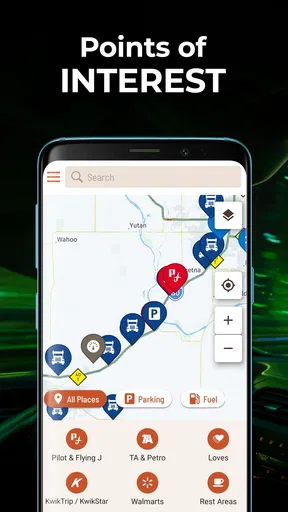
The first thing you’ll notice when you fire up Hammer: Truck GPS & Maps is its clean and straightforward interface. It’s designed with truckers in mind, offering easy navigation and a no-fuss layout. The main screen greets you with a map view that’s both crisp and detailed, allowing you to zoom in and out with ease. What I loved is that it doesn’t bombard you with unnecessary clutter, so you can focus on what truly matters—your route.
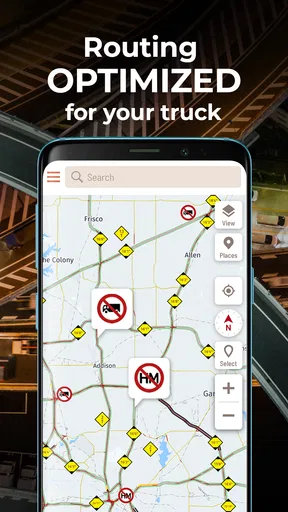
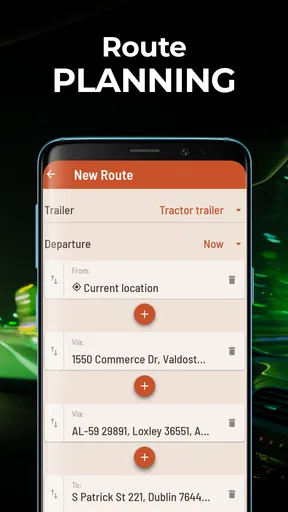
Setting up your profile is a breeze, and you can customize various parameters like vehicle size and weight. This feature ensures that the app tailors routes specifically for your truck, avoiding low bridges and weight-restricted roads. Trust me, this is a game-changer when you’re out on the open road.
For best results, I’d treat that vehicle profile as trip-critical setup, not a one-time form to tap through and forget. A tractor-trailer and a smaller delivery truck do not have the same practical limits, so entering the right vehicle details is part of making the route useful. Before starting navigation, I’d also compare the proposed roads with the delivery address and any instructions from the shipper. The app can guide a route, but it cannot know every temporary site rule or last-minute change.
Voice guidance, alerts, and attention
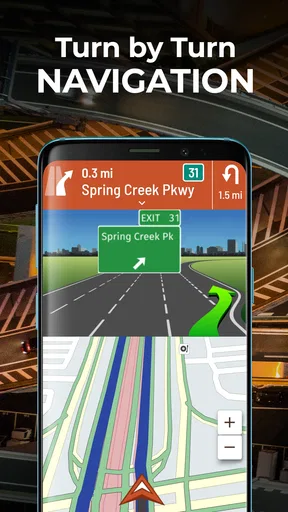
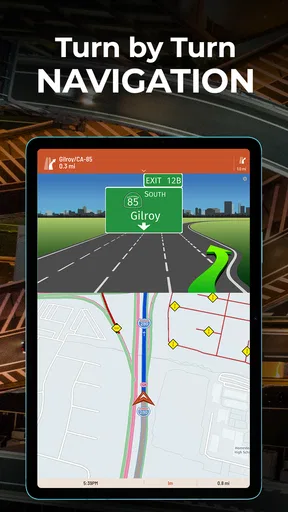
Let’s talk about the heart of this app—the navigation. Hammer offers turn-by-turn directions with real-time updates, ensuring you’re always on the best path. What’s really cool is the inclusion of voice-guided navigation, which keeps your hands free and your eyes on the road. The voice prompts are clear, albeit a bit robotic, but hey, it gets the job done!
Worth Reading Before You Choose

EA SPORTS FC Mobile 26 Is a Bigger Football Game, but It Takes Time

Flipboard Shows What News Apps Must Do Beyond the Feed

Switching to Android Auto Means Rethinking Your Driving Routine

Google Calendar Makes a Crowded Week Easier to Manage

Ludo King Makes the Most of the Minutes Between Plans

Baby Panda World Brings Quick Play to Modern Phones, but Its Game Library Feels Busy
Voice prompts are especially useful when a driver needs to keep attention on traffic, mirrors, and lane position instead of repeatedly checking the display. Still, I wouldn’t assume spoken guidance removes the need to review a complicated turn in advance. At a depot entrance, a tight interchange, or a crowded urban junction, I’d check the map while safely stopped and listen for the next instruction without trying to operate the phone while moving.
There is a useful distinction between the app being readable and the app being effortless for every driver. A simple map can reduce visual clutter, but screen size, glare, mounting position, eyesight, and personal preference all affect how easy it is to use. I’d set up the phone before the vehicle moves, keep it mounted within a sensible line of sight, and avoid relying on small on-screen details during a demanding manoeuvre. Anyone who finds spoken prompts hard to follow may need a different navigation setup or another way to confirm turns.
Road information and real-world judgement
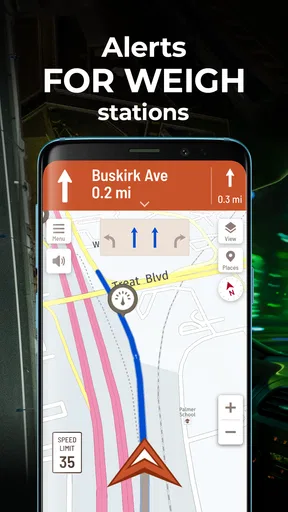
One feature that stood out to me is the traffic and weather updates. Hammer keeps you informed about road conditions, potential hazards, and any pesky traffic jams. It’s like having a sixth sense for the road! Plus, it provides re-routing options that are remarkably quick, helping you avoid unnecessary delays.
That can help when a queue appears or conditions change, but a quick reroute is not automatically a better truck route. I’d pause before following a new path that leaves a main road, especially if it enters residential streets or an unfamiliar industrial area. The practical habit is to use the alert as a prompt to reassess, not as permission to make a sudden turn. A truck driver still needs to check signs and judge whether a suggested road suits the vehicle and the situation.
Planning breaks, fuel, and a typical workday
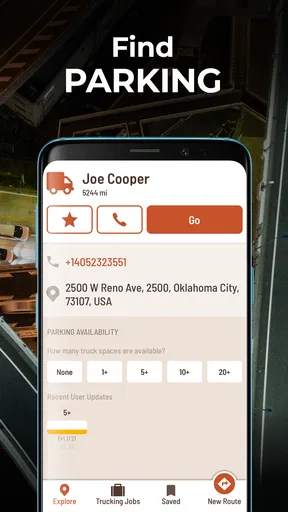
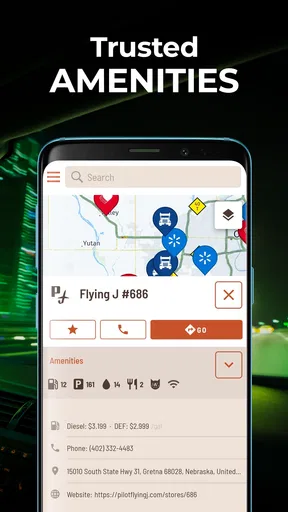
And for those long hauls, the rest stop and fuel station locator is a nifty addition. It pinpoints truck-friendly locations, making it easier to plan breaks and refueling stops. You can even filter these by amenities, ensuring you find exactly what you need.
Here’s how I’d use that on an ordinary shift: before setting off, I’d look at the route and identify a suitable fuel or rest stop near a sensible break point, rather than waiting until the fuel gauge or fatigue forces a rushed choice. If the first option looks unsuitable, having the map open gives me a chance to consider another location. I’d still confirm that a stop works for the vehicle and the plan; a map pin is a useful lead, not a guarantee that a space or a particular facility will be available when I arrive.
This is also where Hammer differs from the general navigation apps many people already know. Those apps can be convenient for everyday car journeys and familiar addresses, while Hammer’s truck orientation makes vehicle-aware routing and truck-related stops more central to its purpose. I would not treat either type as a universal winner: for a car trip, a familiar general map may be simpler, while for commercial driving I’d rather begin with a tool designed around truck constraints and cross-check when the route has high consequences.
Community reports and staying connected
Another aspect I found intriguing is the community-driven nature of the app. Users can report road incidents, speed traps, and other vital info. It’s like having a network of fellow truckers watching your back. The app also supports integration with other tools, allowing you to keep all your travel info in one place. It’s this connectivity that makes Hammer more than just a GPS app—it’s a travel companion.
Community reports are most valuable as timely clues, not unquestionable facts. Conditions can change between one driver’s report and another driver’s arrival, and a report should never distract from driving or encourage risky choices. My practical approach would be to review information before departure or while safely stopped, then use it to decide whether I need a closer look at the route. That keeps the community element helpful without turning the screen into another demand for attention.
Offline use, battery, and remaining barriers
In terms of performance, Hammer is pretty solid. The map loads quickly, and the app runs smoothly without any noticeable lag. I did notice that it can be a bit of a battery hog, so keep a charger handy, especially on those longer trips. But that’s a small price to pay for the wealth of information it offers.
The GPS accuracy is commendable, and I rarely found myself second-guessing the directions. It’s reliable, which is crucial when you’re navigating unfamiliar territories. The app’s offline maps are a lifesaver when you hit those dead zones with no cell service.
Offline maps make a real difference when service drops, but I’d prepare before reaching a remote stretch rather than assuming every part of the experience will work identically without a connection. Download or check what you need while connected, and keep the phone powered during a long shift. The battery cost is a practical drawback, especially for drivers who use a phone for work all day; a vehicle charger and a secure mount are sensible companions, not optional afterthoughts.
There are also limits to what any phone-based navigation screen can do for different sensory and motor needs. Voice guidance can reduce the need to look down, yet a robotic-sounding prompt may not suit every listener, and a driver who has difficulty hearing directions may need a clear visual check while safely stopped. Touch controls can be awkward for anyone with limited dexterity, gloves, or a bumpy cab environment. I’d configure the route before moving and avoid trying to adjust settings on the road.
Hammer is not the right choice for someone who only needs simple car directions or who wants a navigation app that requires no vehicle-specific setup. It may also be a poor fit if you prefer a different voice style, find phone-based maps tiring to read, or need a workflow that does not depend on a charged phone. For those drivers, a familiar general navigator or dedicated in-vehicle equipment may be more comfortable. I’d still keep Hammer as a second opinion if truck routing is relevant, but I would not force it into a role it does not suit.
What to know before relying on it
The app is free to install and is rated for Everyone; its current version is 2.19.3, and it runs on Android 7.0 or later. It has a 4.7 average from around 64,000 ratings, with more than a million installs. Those figures suggest it has found a substantial audience, but they don’t tell me whether a particular route or interface will fit an individual driver. I’d test it on a familiar trip first, learn how its truck profile affects routing, and only then rely on it for a demanding delivery.
One question drivers often have is whether they can use it as their only navigator. I’d say it can be a useful primary guide for truck-focused trips, but I would keep a backup way to check important directions and restrictions. Another practical question is whether it helps when mobile service disappears: the offline maps are valuable in dead zones, provided the relevant map area is ready beforehand. For a driver concerned about fuel or breaks, the locator can help with planning, though I’d verify the stop is appropriate rather than assuming every pin meets the day’s needs.
A more considered verdict for different drivers
So, is Hammer the app you’ve been searching for? I’d say it’s definitely worth a try. It’s tailored for truckers, offering a suite of features that make life on the road a bit more manageable. From its user-friendly interface to its real-time updates and community-driven insights, it’s a robust tool for any trucker’s arsenal.
While it does have a few quirks—like its battery consumption—these are minor compared to the benefits it provides. So, download it, give it a whirl, and hit the road with a little more confidence. Happy trucking!
My recommendation is strongest for commercial drivers who want truck-aware route planning, useful stop-finding, and a map that acknowledges the difference between a truck and a car. I’d be more cautious for drivers who need unusually simple controls, depend on a particular style of spoken guidance, or cannot keep a phone charged through a shift. In those cases, a different device or a familiar alternative may be the more accessible choice.
For me, the best way to judge Hammer is to try it on a low-pressure route, set the vehicle profile carefully, and see whether its map, voice prompts, and stop information work with your own driving routine. Its thoughtful truck focus is a genuine reason to give it a place in your navigation toolkit; sensible cross-checking and attention to your own access needs are what make that choice work in practice.
Pros
- Real-time traffic updates enhance navigation.
- Customizable routes for different vehicle types.
- Offline maps available for remote areas.
- User-friendly interface with clear visuals.
- Regular updates improve app functionality.
Cons
- Limited support for older devices.
- Occasional GPS signal loss in urban areas.
- High battery consumption during use.
- Some features require a premium subscription.
- Initial setup can be time-consuming.
FAQs for Hammer: Truck GPS & Maps
What is Hammer: Truck GPS & Maps?
Hammer: Truck GPS & Maps is a specialized navigation app designed specifically for truck drivers. It provides truck-friendly routes, avoiding low bridges and weight restrictions, ensuring safe and efficient travel. With real-time traffic updates and customizable maps, it's tailored to the unique needs of professional drivers.
Is Hammer: Truck GPS & Maps available for both Android and iOS?
Yes, Hammer: Truck GPS & Maps is available for download on both Android and iOS platforms. Users can easily find and install the app from Google Play Store for Android devices and the Apple App Store for iOS devices, ensuring accessibility across major mobile operating systems.
Does Hammer: Truck GPS & Maps require an internet connection?
While Hammer: Truck GPS & Maps offers offline map capabilities, an internet connection is recommended for real-time traffic updates and live route optimization. This ensures the most accurate and efficient navigation based on current road conditions and potential delays.
Are there any subscription fees for using Hammer: Truck GPS & Maps?
Hammer: Truck GPS & Maps offers both free and premium features. While many core functionalities are available at no cost, a subscription may be required for advanced features such as enhanced traffic data, updated maps, and additional customization options, providing a comprehensive navigation experience.
How accurate is the routing feature in Hammer: Truck GPS & Maps?
The routing feature in Hammer: Truck GPS & Maps is highly accurate, utilizing up-to-date map data and real-time traffic information. It considers truck-specific restrictions and road conditions to provide the most efficient and safe routes, minimizing the risk of encountering obstacles unsuitable for large vehicles.


